
- SAP Support
- AI authoring
- Research
Adoption, not capability, is the product
Support Studio, 2025 — now
Support Studio lets SAP support engineers author, test and evaluate their own AI automations (case summarisation, auto-response, routing, root-cause analysis) without writing code. I lead the design within the AIT UX team: uncovering how support engineers really work, shaping product strategy with product owners and engineers, and prototyping through a toolchain that kept changing under my feet.
The hardest truth the research surfaced: a generic AI framework demos well but never ships unless the knowledge in experts’ heads actually makes it into the system. That made adoption, not capability, the thing to design for.
The context
SAP’s support organisation handles an enormous volume of cases. Behind every case, a support engineer makes a sequence of judgement calls: What is this customer actually asking? Has this been solved before? Which team owns it? What’s the right response?
That work happens in ServiceNow, where cases arrive, so that is where the experience starts. As an engineer works a case, Joule suggests artefacts (skills and workflows) that could already help with it.
Much of that work is repetitive and pattern-based, exactly the kind AI can accelerate. But the people who understand the patterns best aren’t engineers who write Python. They’re domain experts in support.
Support Studio began as an incubation project: a bet that with the right authoring environment, support engineers could encode their own expertise into reusable automations. As interest in support automation grew, the experiment snowballed into a product of real strategic interest. That raised the stakes, brought in more stakeholders and forced a hard question: how do you design a serious product around a problem space that is still being defined, using tools that change month to month?
The core design problem
Support engineers needed to:
- express their expertise as repeatable logic (fetch the case, search for known solutions, verify, draft a response) without learning to code;
- understand what the AI was doing at each step, so they could trust and debug it;
- test and iterate against real cases before letting an automation run;
- stay in control: AI assists the expert, it doesn’t replace their judgement.
Underneath all of these sat a deeper constraint. The real value isn’t “add AI”; it’s getting the operational context that lives in expert engineers’ heads out of their heads and into the system. If experts don’t use the tool, that context never arrives and the automation never improves. Adoption stops being a vanity metric and becomes the product.
My role
I’m the lead designer, working inside a scrum team with product owners, developers, data scientists and data engineers, and with a design and research partner on the AI-context work.
- Strategy: shaping what the product should be with the product owners as scope grew from incubation to a cross-organisation initiative.
- Research: discovery and evaluative research with real support engineers, including a focused study on what context the AI needs.
- Design: concept, interaction and prototyping, translating between the data scientist’s mental model (pipelines, schemas, models) and the support engineer’s.
Research: how support actually works
The research was deliberately small, qualitative and iterative, the right call for a high-expertise domain where depth beats breadth.
I ran it with a research partner. Each of us led sessions with different engineers and observed the other’s, so every session had a second pair of eyes and we could compare what we heard before drawing conclusions.
- Contextual inquiryObserving key support engineers in their real work and documenting actual use cases, not idealised ones.
- Live case walkthroughsEngineers narrated how they truly work a case, step by step, so we could map the real workflow.
- Evaluative prototype testsEngineers judged whether they could perform the creator’s tasks in an interactive prototype, before engineering effort was committed. We ran these usability tests the same way: one of us led, the other observed.
- Expert benchmarkAn expert builds the ideal automation; a non-expert gets only a brief and tries the same. Time and quality give a repeatable read on the gap.
I also ran several hours of requirements interviews with an embedded senior support engineer, grounded in real cases. And I designed two frozen test cases, one simple baseline and one complex and time-critical, with fixed inputs, held stable for months so every iteration stayed comparable.
Shortening research with AI
AI cut the time from interview to insight, and then from insight to prototype:
- 1.Record everythingInterviews and test sessions were recorded and transcribed, so nothing depended on notes taken mid-conversation.
- 2.Synthesise with Claude CodeFrom the transcripts, Claude Code mapped the engineers’ flows and the tools they used, summarised each session and surfaced candidate insights across sessions.
- 3.Carry it into the prototypesThe same knowledge became context for prototyping in Claude Code, so the designs started from how engineers actually work.
The AI did not replace the researchers. We still had to lead each interview and ask the right questions to draw out the knowledge experts rarely say out loud, and we decided what the patterns meant. A project about augmenting experts with AI was itself researched with AI augmenting the designers.
Three roles, defined from the work
- Dana, the creatorAn expert engineer, roughly in the top fifth, with some prompt-engineering fluency. Designs and owns automations for her use cases.
- Ada, the approverA product-area or knowledge lead who validates business relevance and signs automations off for wider use.
- Carl, the consumerA knowledge engineer who uses approved automations every day, with light, no-code customisation within limits.
What the research revealed
- Follow the domain modelEngineers think in steps and decisions, not code and data structures. Wherever the prototype’s hierarchy diverged from how they reason, they stalled.
- Name things by outcomeSystem vocabulary like “Data Call” and “LLM Call” was the biggest comprehension blocker. Engineers renamed flows by what they produce: “the answer for consulting requests”.
- A blank canvas is a burdenThe empty builder had no guidance and an undocumented vocabulary. Experts asked to be guided, which moved the user from operator to supervisor.
- Real automations are shortEngineers judged that most need no more than about five steps, and that more than about three AI-reasoning steps degrades quality.
- The system never sendsShort of near-perfect reliability, the accepted model is human in the loop: the system drafts, the engineer reviews, edits, sends and owns the reply.
- Keep the layout, tighten the interactionThree columns read naturally left to right, but the detached detail panel and back-and-forth clicking broke the flow.
- Dummy content is untestableGeneric content left users unable to predict how the system should behave. Realistic, case-connected data is a prerequisite for valid testing.
- Adoption is the real riskOne expert invited ten colleagues to review his new automations; one engaged. This set the success metric for everything that followed.
Strategy: from blank canvas to guided coworker
With the product owners, I turned these findings into direction:
- Automations are built from understandable steps (fetch data, ask the AI, make a decision, call a service), so the vocabulary stays small.
- The expert composes; the system executes.
- Trust comes from visibility: inputs, outputs and decisions at every step, especially when something goes wrong.
- Adoption is the explicit success metric. Favourites, versioning, outcome-oriented and department-aware naming, in-context use and real frozen test cases all target it directly.
The first model was a step-by-step workflow. Select a step to see what an engineer sees while testing:
Input
Case number from the support queue
Output
Customer message, product area, priority
The guidance and human-in-the-loop findings pushed the concept toward an AI coworker: the engineer picks the automation going in and signs off the draft going out; the AI assembles the work in between.
What we did with that
Rather than treat it as a failure, I treated it as the clearest signal yet about where the leverage was: meet engineers where they already work, and rethink what Support Studio itself should own.
The answer: its most durable value isn’t being the only place you build automations. It’s being the governance, testing and observability layer that makes whatever an expert builds trustworthy enough for customers.
From assembly line to workshop
As the product matured, the execution model itself had to change.
- 1.0: an assembly lineA linear workflow. The human gives input once and the AI produces a finished result with no further involvement. Too brittle for complex, judgement-heavy work.
- 2.0: a workshopHuman and AI work on the same piece. A dynamic orchestrator assembles the right skills for the case; the human brings judgement and intent.
The strategy is master and apprentice: the engineer sets the rules, context and judgement, and the AI acts within those boundaries. The apprenticeship runs both ways. For complex tasks, the engineer also has to learn the AI’s logic and limits, which shaped how much of its reasoning the interface makes visible.
Two distinctions decided where each part of the experience lives:
- Deterministic and non-deterministic work. Exact, granular changes (“change how this document lookup behaves, and nothing else”) stay as explicit workflow edits, where predictability is the point. Orchestrated skills, where a model decides at runtime, get an authoring experience of their own.
- A division of labour across surfaces. Conversational skill authoring happens where engineers already work, in the flow of a case in ServiceNow. Granular workflows are built in Support Studio. And Support Studio is the shared test bench and repository where every artefact is run against real positive and negative cases, traced, evaluated and refined.
An adoption loop falls out of this. Every case in ServiceNow is a chance to grow the library: Joule suggests what already exists, and the engineer decides what to do with it, right when the need is felt and the context is in front of them.
- Reuse it as isAn existing artefact fits the case. The engineer runs it and moves on.
- Improve oneAn artefact almost fits. The engineer adapts it for this case, and the improvement carries over to every similar case after it.
- Create a new oneNothing fits. The engineer builds a new artefact so the next person who meets the same situation starts ahead.
Giving the AI the engineer’s context
A dedicated strand of research asked what the AI needs to see to help like a trained support engineer. The principle I kept returning to: “we don’t train a junior with half the handbook.” Good automations need an AI that knows the case as well as the engineer: the full case file with attachments, the connected knowledge-base articles, the cases linked to them, and the reasoning around them.
- Document handlingThe AI sees exactly what’s in the case, screenshots and PDFs included, read the way the engineer reads them.
- Artefact typesThe AI has the tools, skills and resources the expert has, modelled as reusable building blocks.
- ObservabilityThe AI gets feedback on every case: how it performed, where it failed and why.
These three rules turned “build one automation” into a durable system design, and fed directly into the 2.0 prototype.
How the product changed
The research and strategy show up clearly when you put the old tool next to the new one.
Before, in 2024: a catalogue of prompts. Each automation was a single prompt template tied to one model. Engineers edited raw system, user and assistant text and tested it against one case at a time.
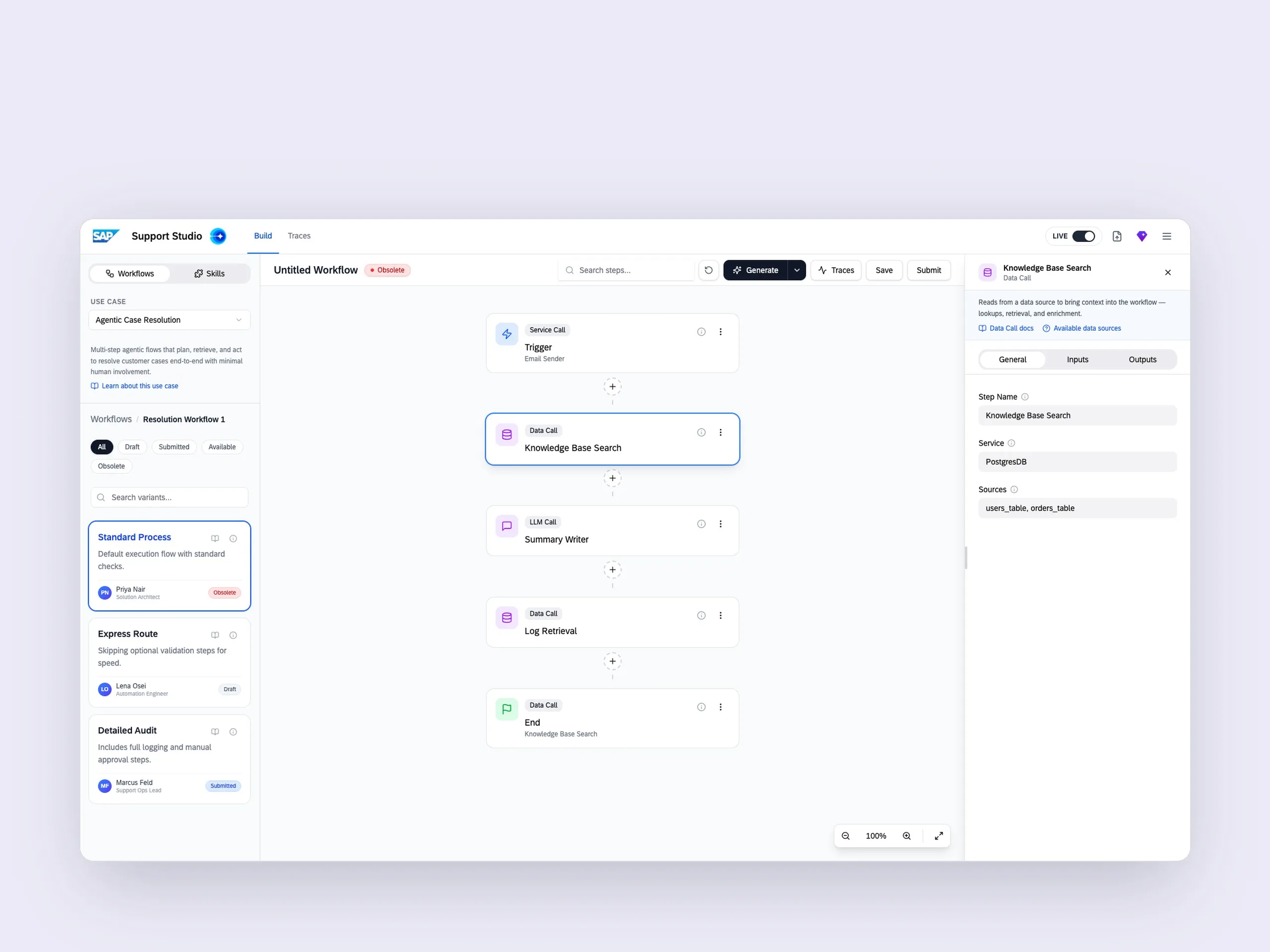
Now: a studio for workflows. Automations are built from typed steps, such as data calls, AI calls and service calls, that engineers can read at a glance and configure in a side panel. Each use case holds variants with an owner and a review status, so teams can see what is in draft, submitted or obsolete, and trace every run.
Design: harness, skills and traces
The current prototype is organised around a few surfaces that mirror how experts reason:
- A harness of skill setsAutomations live in a scoped hierarchy where shared subskills are inherited, not copied. A tone-of-voice rule lives in one place and is reused everywhere.
- Skills in plain language, or by voiceEngineers describe what they want and the AI drafts step-by-step skills with guidance. A skill is a set of versioned artefacts: subskills, resources and reference cases.
- Test against realityEngineers attach real reference cases, run a skill against them and inspect the output before trusting it.
- Triage with confidenceEach routing decision carries a confidence score. A case with no confident match goes to a person rather than into the wrong automation.
- Guardrails by defaultAnonymising customer data and moderating AI output happen automatically, so engineers stay focused on the logic.
The video below shows the end-to-end vision. It opens with a concept: an engineer asks Joule to build a skill, answers a few guided questions and checks a preview before anything is saved. The skill then lands in Support Studio, the part we shipped as the pilot MVP, where engineers edit it, test it on a sample case, publish it and review every run in traces.
Trust through evidence
An AI model never gives exactly the same output twice, so trust can’t come from inspecting one run. It has to come from evidence across many runs. Every output leaves a trace: the case it saw, the knowledge and tools it used, each step, and what the engineer changed before sending, and why.
- Short evaluation loopsA thumbs up or down and a short note on a result, feeding the next iteration.
- Cohorts and overridesEach skill version is measured on its own traces. Fewer overrides per hundred uses means a version is really being adopted.
- SaturationHas the catalogue of failures stopped growing? Then the automation has seen enough variety.
After a couple of months of pilot use, this layer puts numbers on what matters: speed of communication, how often engineers accept a suggestion, how fast skills are created and improved, adoption, and model cost.
Designing while the tools changed
Classic Figma
Static and interactive prototypes to establish the concepts and run early research.
Figma Make
AI-assisted generation for higher-fidelity, more interactive prototypes, faster.
Claude Code and the SAP UI Kit
Claude Code in VS Code plus Figma Make with the official SAP Figma Make UI Kit: prototypes that are fast to produce and look and behave like production SAP software.
Staying fluent in fast-moving AI design tools became part of the job. Near-functional prototypes changed my relationship with the engineering team: we debated real interactions, not static mock-ups, and testing feedback got sharper.
The outcome
Support Studio is live for a pilot group of support engineers, used on real cases. Engineers share feedback in recurring office hours and through short in-product evaluation loops, and that feeds straight back into research and design. Because every run leaves a trace and every skill version is measured on its own cases, the team can put real numbers on adoption, overrides, speed and cost rather than guessing.
- Status
- Live in pilot
What’s next
Support Studio is becoming a place where engineers create, test and evaluate a broader palette of AI artefacts: skills and subskills, workflows as one artefact type among several, and agents, tools and knowledge references composed for a case. Built-in evaluations mean experts won’t only author AI behaviour; they’ll validate it with evidence.
Its enduring role is governance and evidence. Wherever an artefact is authored, this is where it’s made fit for customers: templates keep artefacts discoverable and routable, compliance is handled in context, and traces and evaluations prove an artefact performs before it’s trusted at scale.
The design challenge grows from “help someone build one automation” to “help a community of experts build, compare and trust a growing library of AI artefacts”. That’s what I’m designing toward next.